15. August 2026
Building HabitPulse – A Daily Habit Tracker
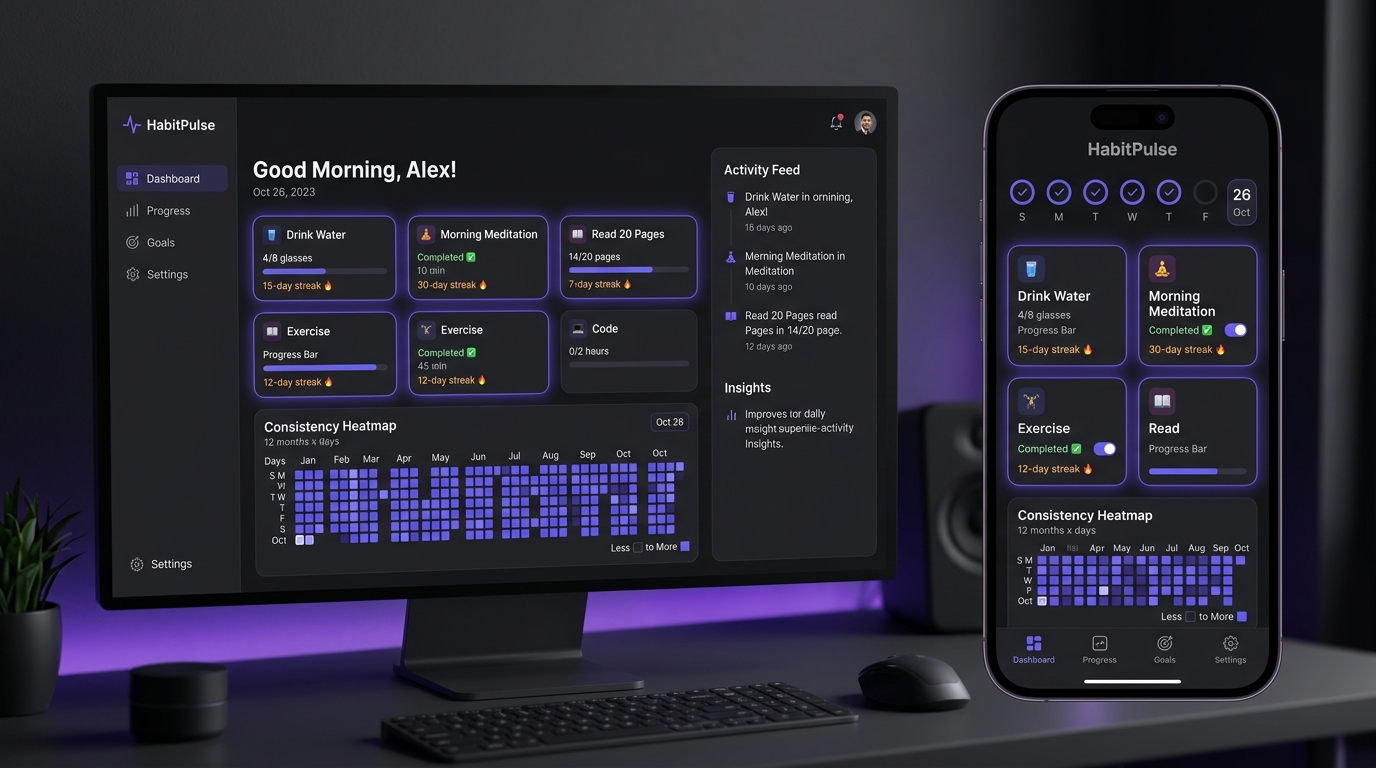
After building the single-file offline meal planner, I wanted to do something similar for habit tracking. I wanted a clean, fast habit tracker that:
- Works 100% offline out-of-the-box using local storage.
- Supports optional Cloud Sync so data syncs across my devices.
- Tracks different habit types: simple Yes/No checks, numeric targets (e.g. 8 glasses of water with steppers), and duration timers (e.g. 20 min meditation).
- Shows visual analytics: heatmap, streak counters, and weekly trend graphs.
- Packages into an Android app that runs full-screen without a browser address bar.
I used Google Antigravity again to build and refine the whole thing.
The Prompt
I started with a simple prompt:
Let's create a new project - Let's build a daily habit system - let's develop a static HTML / JS app that I can upload to my VPS. We can use Firebase as the back-end (let me know what needs to be done).
Antigravity has access to my project folder and it created a new one. Further it created an implementation plan, asking me to review. The Implementation plan had the following sections:
- User Review Required
- Firebase Backend services - specified how authentication would work
- Dual Storage Engine (localStorage + Cloud Sync)
- VPS and Firebase Setups
- Proposed Features
- Daily Tracking
- Habit Engine and Analytics
- Habit Management
- Data Export / Import
- Proposed Structure
- Firebase Setup Requirements
- Verification Plan
I reviewed the implementation plan and asked Antigravity to go ahead; and voila - the first version of the app was ready. I reviewed the Firebase Setup Requirements and followed them to ensure the app could connect to Firebase. Once done, I tested the app on my browser.
It looked good, so asked Antigravity to deploy it to my VPS under https://habit.ahuja.ws
ok - upload it to my VPS - use the address: habit.ahuja.ws - login using ssh root@xxxxx

Create a deploy script that:
1. Updates the git and pushes to github.com
2. Deploys to the VPS
That’s all it took for me to build an actual app that works, everything after this was pure refinement.
Mobile Refinements
Testing the app on my phone showed a few immediate UI issues that needed fixing:
- Multi-Row Habit Cards
Initially, steppers, timers, and checkboxes were crammed into the same row as the habit title. On a phone, titles got cut off (e.g.,
Morning MeditationbecameM..). I had Antigravity redesign habit cards into two rows:- Top row: Emoji icon, full multi-line title, category pill, frequency, and streak badge.
- Bottom row: Wide 1-tap complete buttons for check habits, +/- steppers with mini progress bars for numeric habits, and timer controls with countdowns.
- Custom Sunrise Morning Filter
The time-of-day filters (
All,Morning,Afternoon,Evening) were originally text buttons that overflowed horizontally on mobile screens. I replaced them with compact icon chips, including a custom golden sunrise vector SVG for the morning filter. - Single-Tap Google Authentication Instead of email/password forms and account registration flows, I kept authentication to a single 1-tap “Continue with Google” button with automatic redirect fallbacks for mobile browsers.
- Bottom Sheet Modal On mobile, creating or editing a habit involves setting multiple fields – title, motivation, category, time of day, tracking type, frequency, icon, and theme color. The modal now opens as a bottom sheet with momentum touch scrolling, with the “Save Habit” and “Cancel” action bar pinned to the bottom so it’s always reachable by thumb.
- Category Chips & Action Bar
Separated the Category and Time of Day selectors into dedicated rows with quick-tap category chips (
Health,Fitness,Productivity,Mindfulness,Learning,Finance), and placed the habit actions (↑,↓,✏️,🗑️) in a clean row across the bottom of each habit card.
All of this was sorted by sharing screenshots with Antigravity and describing the problem. One example would be:
I still need to scroll the Morning, Afternoon, evening filters - change them to only icons without the text. Change the morning icon - this is not as clear as afternoon or evening.
Packaging into an Android App
Having the web app live on my VPS (https://habit.ahuja.ws) was great, but for a daily habit tracker, I wanted an icon on my phone’s home screen that I could use daily.
I asked Antigravity:
Looks good. What would you need to create an android app and publish it to the Google App store. Don't do it now, just tell me what would be needed
Antigravity responded with two options:
- Trusted Web Activity (TWA) - Bubblewrap (Recommended)
- Capacitor / Cordova Wrapper
It also mentioned that I needed a Google Developer account and 20 testers before I could upload this to the Google App Store - I’ve put that on hold for now. I decided to go ahead with the recommended option:
Let's create the app using Bubblewrap - I'll publish to Google App store later
Antigravity managed the whole process - installing Bubblewrap, Android SDK, generating the manifest.json, icons, and gave me the following:
- Play Store Bundle (.aab file) that I can upload to Google Play Store when I decide to
- Standalone APK that I can install on my android phone
That’s it - it was so easy to develop an app for tracking my habits. The equivalent app(s) on Google Play Store are either have paid subscription tiers to put in more than 2 habits, or show ads that are intrusive. I don’t need them now. You can also use the app in your browser at https://habit.ahuja.ws - if you want the APK file reach out and I can send it across to you.